Educational Disclaimer: This content is strictly for educational and research purposes and does not constitute financial, investment, or legal advice. Prediction markets carry liquidity, execution, regulatory, and smart contract risks, and access depends on where you live. Always conduct independent due diligence.
About the Author: Written by redpakpak, an independent research initiative focused on on-chain risk analysis, DeFi mechanisms, and tokenized real-world asset structures.
Updated October 2026: This guide was rewritten to match Polymarket’s official documentation on order books and price display. An earlier version described an AMM-based pricing model, which does not reflect how Polymarket works today.
If you have ever opened Polymarket and wondered why a market shows 61% while your buy fills at 64¢, this guide is for you. The short answer: Polymarket prices come from an order book, not a formula. The number on the screen is a summary of that book, and the price you actually pay depends on who is willing to sell to you.
For a contrast with formula-based exchanges, see our Uniswap v1 to v4 beginner guide. Uniswap uses a pool and a pricing curve. Polymarket does not.
1. Polymarket uses an order book, not an AMM
Polymarket runs a Central Limit Order Book (CLOB). Traders post orders saying “I will buy YES at 58¢” or “I will sell YES at 62¢.” The platform matches compatible orders. Polymarket itself does not set the price.
The system is described as hybrid-decentralized: orders are matched off-chain by an operator, and matched trades settle on-chain on Polygon. Users keep custody of their funds, and orders are cryptographically signed messages.
Each share settles at $1.00 if its outcome happens and $0.00 if it does not. That is why every price sits between 0¢ and 100¢, and why a price of 60¢ is read as a 60% implied probability.
2. Where shares come from
When a market opens, there are no shares and no price. Shares are created when two opposite orders add up to $1.00.
Example: Alice places an order to buy YES at 60¢. Bob places an order to buy NO at 40¢. Together they put in $1.00, which becomes one YES share for Alice and one NO share for Bob. That match also sets the first market price: YES at 60¢, NO at 40¢.
After that, shares can also change hands directly, when someone who already holds YES sells to a new buyer. Either way, the same rule holds: YES and NO prices stay close to adding up to $1.00.
3. How the displayed price is calculated
The order book has two sides:
- Bids: buy orders. The best bid is the highest price anyone will pay right now.
- Asks: sell orders. The best ask is the lowest price anyone will accept right now.
The gap between them is the spread. Polymarket displays:
- The midpoint of the best bid and best ask, in normal conditions.
- The last traded price, if the spread is wider than 10¢.
Here is a sample YES order book we will use throughout this guide:
| Side | Price | Shares available |
|---|---|---|
| Ask | 67¢ | 1,000 |
| Ask | 64¢ | 500 |
| Ask (best) | 62¢ | 300 |
| Bid (best) | 58¢ | 400 |
| Bid | 56¢ | 600 |
Midpoint = (58¢ + 62¢) ÷ 2 = 60¢. The market displays 60%.
Notice that nobody can actually buy at 60¢ here. A buyer pays the ask (62¢ or more). A seller receives the bid (58¢ or less). The displayed price is a reference point, not a guaranteed fill.
4. Why Buy asks for dollars and Sell asks for shares
The trade ticket on Polymarket looks different depending on the direction:
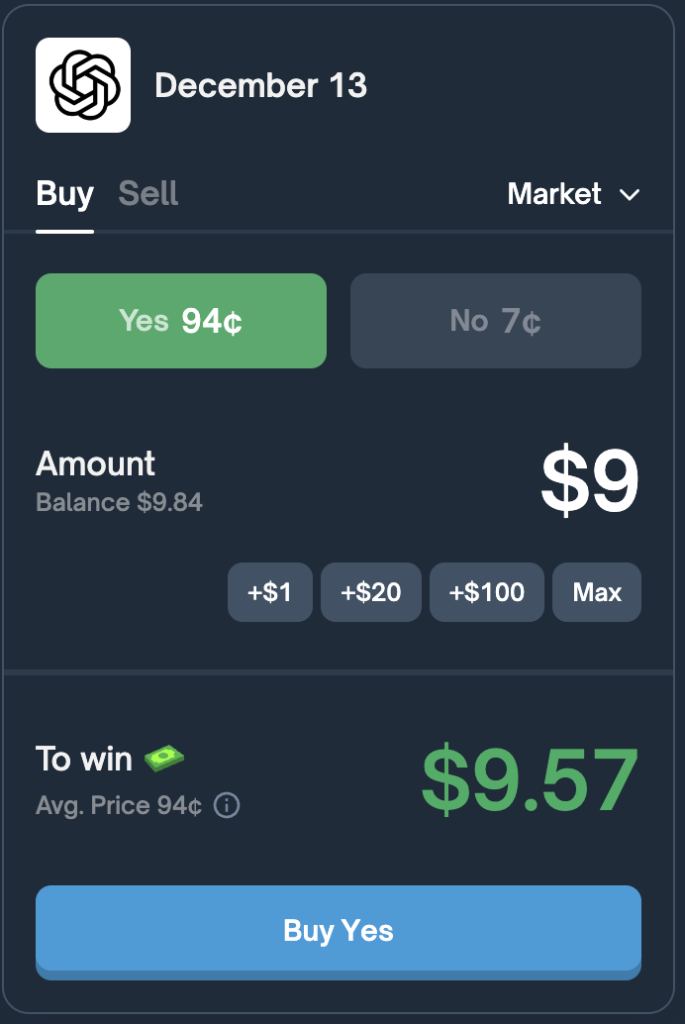
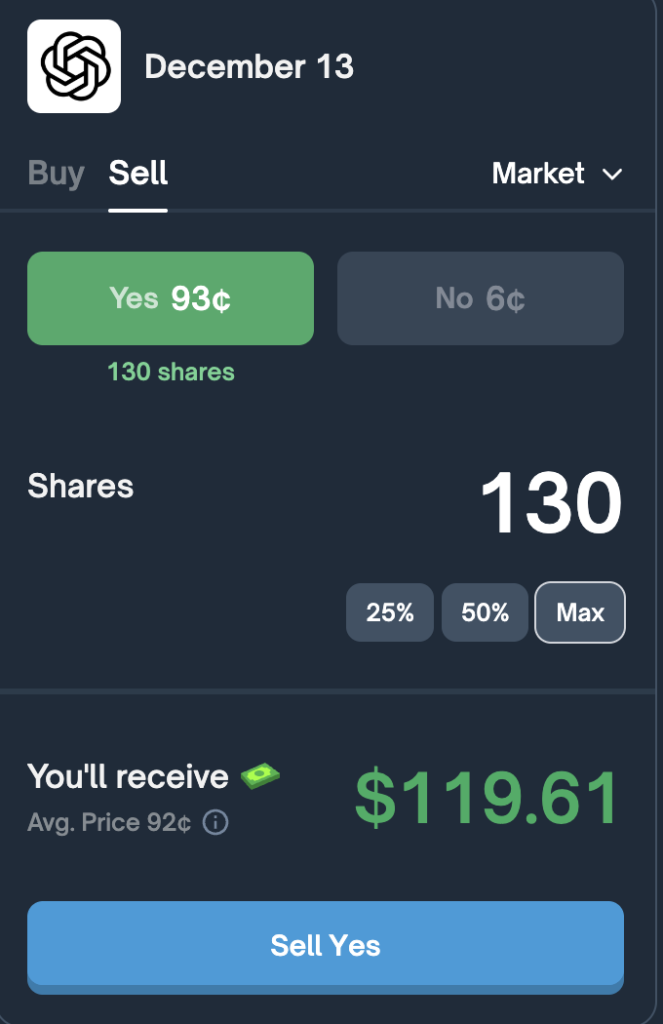
This is an interface design choice that matches what each user is holding. A buyer starts with cash, so the natural question is “how much do you want to spend?” A seller starts with shares, so the natural question is “how many do you want to sell?” Because the book has several price levels, the number of shares a buyer receives (or the cash a seller receives) depends on how deep into the book the order reaches.
5. Market orders vs. limit orders
On Polymarket, every order is technically a limit order. What the interface calls a “market order” is a limit order priced so that it executes immediately against orders already resting in the book.
| Market order | Limit order | |
|---|---|---|
| What you choose | Amount only | Amount and price |
| Execution | Immediate, against resting orders | Waits in the book until someone matches it |
| Price you get | Best available, then worse levels if your order is large | Your price or better, if it fills |
| Role | Taker: removes liquidity | Maker: adds liquidity |
| Can it change the displayed price? | Yes, by clearing price levels | Yes, if it becomes the new best bid or best ask |
The last row is the most common misconception. Both order types can move the displayed price, because the displayed price is built from the best bid and best ask.
6. Worked example: how each order type moves the price
A market buy of $400
Starting from the sample book above (displayed price 60%), a trader places a market buy for $400 of YES:
- It takes all 300 shares at 62¢. Cost: $186.
- The remaining $214 buys shares at 64¢: $214 ÷ 0.64 ≈ 334.4 shares.
The trader receives about 634.4 shares for $400, an average price of about 63.1¢, not 60¢. That difference is slippage.
The 62¢ level is now empty, so the best ask becomes 64¢ (with about 165.6 shares left). New midpoint = (58¢ + 64¢) ÷ 2 = 61¢. The display moves from 60% to 61%.
A limit buy at 61¢
Next, another trader places a limit order to buy 200 YES shares at 61¢. No trade happens, because no one is selling at 61¢. But the order becomes the new best bid.
New midpoint = (61¢ + 64¢) ÷ 2 = 62.5¢. The displayed probability rises again, without a single share changing hands.
When the spread gets wide
Now suppose the bids at 61¢ and 58¢ are cancelled, leaving the best bid at 50¢. The spread is 64¢ − 50¢ = 14¢, which is wider than 10¢. Polymarket stops using the midpoint and shows the last traded price instead, which in this example is 64¢ from the earlier market buy.
This rule exists because a midpoint between two far-apart quotes would not say much about what traders actually believe.
7. What to check before placing an order
- The spread. A wide spread means the displayed price may be far from what you will pay.
- Book depth. Large market orders walk through several price levels. Check how many shares sit at each level.
- Average fill price. Compare the estimated average price on the ticket with the displayed percentage.
- Whether you need speed. A limit order can avoid paying the spread, but it may never fill.
- Local rules. Prediction market access is restricted in some jurisdictions. Confirm what applies where you live.
8. Summary
- Polymarket prices come from a central limit order book, not an AMM or pricing formula.
- The displayed probability is the midpoint of the best bid and ask, or the last trade if the spread is over 10¢.
- Market orders are limit orders that fill immediately. They can move the price by clearing price levels.
- Limit orders can also move the displayed price by becoming the new best bid or ask.
- The price you pay is the ask, and the price you receive is the bid, not the displayed midpoint.
How Polymarket Prices Work: FAQ
Why did my buy fill above the displayed price? The display shows the midpoint. Buyers pay the ask, which is above the midpoint, and larger orders can reach deeper, more expensive price levels.
Do limit orders affect the price on Polymarket? They can. A limit order that improves on the current best bid or best ask changes the midpoint, and therefore the displayed probability, even before it fills.
Does Polymarket set the odds? No. Prices emerge from orders placed by users. The operator matches orders but does not choose prices.
Is the displayed percentage a forecast? It is an implied probability based on current orders. It reflects what traders are willing to pay, not a guaranteed outcome, and it can be distorted when markets are thin.
References
- Polymarket Docs: Prices & Orderbook
- Polymarket Docs: How Are Prices Calculated?
- Polymarket Docs: CLOB Overview
Notice: This research analysis is strictly educational. RedPakPak does not provide investment, financial, or trading advice, nor does it endorse any platform.